Request list
By clicking the menu at the top right and selecting “Request list”, the request history created by the various contacts on Quoting24 opens.

Viewing requests
By default, only open requests are shown.
Using the filter at the top right you can:
- view paused requests
- view unread requests
- view closed requests
- apply other filters to refine the search
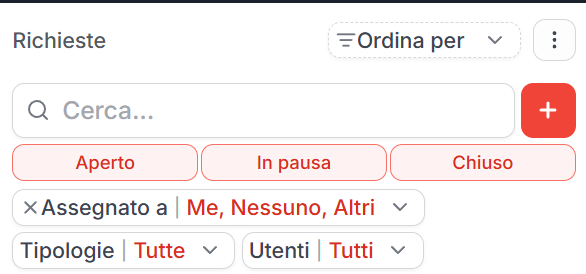
Searching requests
The request list lets you quickly search the tickets in the history.
Search can be used to find a request starting from information such as:
- contact name or number
- linked company
- request content
- ticket status
- recognized technical data, such as license plate or VIN
Filters can be combined with text search to narrow down the list and find the correct ticket faster.
Paused requests
Paused requests are tickets that are not permanently closed, but temporarily suspended because you are waiting for a message or confirmation from the customer.
When the customer writes again on a paused ticket:
- the ticket automatically becomes open
- it remains assigned to the original operator
- previous messages are also shown by default
This behavior is different from closed tickets: on a closed ticket the ordered flow rules apply (reply, reopen only if it is the latest, otherwise a new request or routing to an already open ticket). Details in Ticket management.
Opening a request
By clicking the red arrow at the bottom right of a row, you can open the specific request and access its ticket.
When you open a request, Quoting24 shows the context linked to the ticket, including any previous messages if the request had been paused or linked to other tickets.