Activities
This section is visible only to administrators, not to members (users).
By clicking the lines at the top right in Quoting24 and accessing the section
Settings → Activities, you can manage some fundamental options
of the platform usage experience.
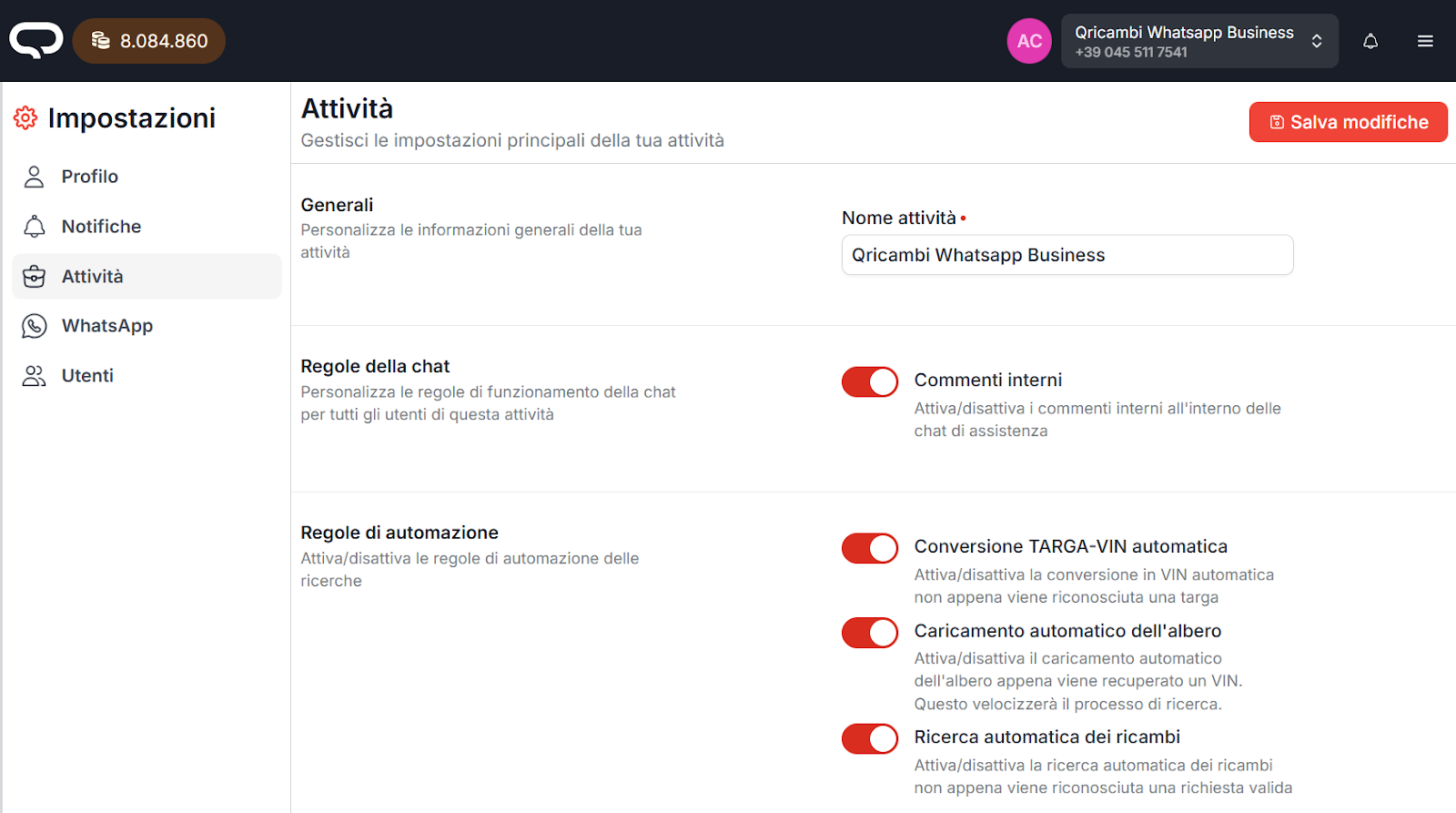
Activity name
You can change the activity name and set any name you want.
Each phone number connected to Quoting24 has its own activity name, which allows users, during login, to easily distinguish which “room” they are going to work in.
Internal comments
From this section you can enable or disable internal comments in chats.
Internal comments allow operators to: - communicate with colleagues - enter notes that are not visible to the customer
Service communications
The Service communications section lets you manage internal messages or notices related to the activity.
These communications are used to inform operators about operating instructions, updates or important notes to keep in mind during daily work on Quoting24.
AI data extraction
Quoting24 can automatically extract useful information from:
- images
- voice messages
- message text
Full recognition settings (box display modes, voice transcription, image reading and text recognition) are in Settings → Artificial intelligence → AI recognition.
All details on how AI works are in the dedicated guide: AI.
From this activity section you can still hide AI data extraction in the operational interface.
The setting is useful when you want to keep the interface cleaner or avoid showing operators the details of automatic processing.